适用场景:GeneratePress 主题(免费版即可),不想装插件、不想改 PHP,只靠「外观 → 自定义 → 额外 CSS」实现。
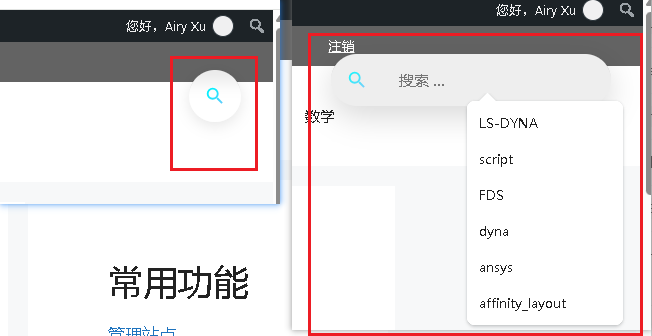
效果:页面右上角常驻一个毛玻璃圆形按钮,鼠标悬停/点击后平滑展开搜索框。
记录日期:2026-10-18
一、最终效果
| 状态 | 表现 |
|---|---|
| 默认 | 右上角半透明毛玻璃圆形按钮,蓝紫渐变搜索图标 |
| 悬停 / 聚焦 | 向右展开为 280px 浅灰圆角搜索框,自动聚焦输入框 |
| 移开 / 失焦 | 自动收缩回圆形按钮 |
| 移动端 | 自动缩小间距,不遮挡内容 |
二、实现原理
核心思路:把主题自带的搜索小工具(右侧边栏)用 position: fixed 从文档流中”拎出来”,变成固定在右上角的悬浮元素。不添加任何 HTML 或 JS。
前置条件:后台 → 外观 → 小工具 → 把「搜索」小工具拖到「右侧边栏」。
三、完整 CSS 代码
路径:外观 → 自定义 → 额外 CSS,整段粘贴:
/* ===== 悬浮搜索按钮(美化版)===== */
#right-sidebar .widget_search {
  position: fixed !important;
  /* 原值:top: 60px; */
  top: 75px; /* 建议改为 75px~85px,完全避开导航栏 */
  right: 32px;
  z-index: 9999;

  /* 核心修改:去掉纯黑,改为浅色半透明 + 毛玻璃 */
  background: rgba(255, 255, 255, 0.85);
  backdrop-filter: blur(8px);
  -webkit-backdrop-filter: blur(8px);

  border-radius: 50px;
  padding: 0;
  box-shadow: 0 4px 15px rgba(0, 0, 0, 0.1);

  width: 52px;
  height: 52px;
  overflow: hidden;

  display: flex;
  align-items: center;

  transition:
    width .35s ease,
    height .35s ease,
    border-radius .35s ease,
    background .3s ease,
    box-shadow .3s ease;
}

/* 悬停 / 聚焦展开(已合并重复项) */
#right-sidebar .widget_search:hover,
#right-sidebar .widget_search:focus-within {
  width: 280px;
  height: 52px;
  border-radius: 26px;
  background: #eee; /* 展开时保持你设定的浅色 */
  box-shadow: 0 10px 30px rgba(0, 0, 0, 0.15);
}

/* 搜索图标:蓝紫渐变 SVG(还原你截图的效果,替代黑色背景+Emoji) */
#right-sidebar .widget_search::before {
  content: "";
  width: 52px;
  height: 52px;
  flex-shrink: 0;
  background: linear-gradient(135deg, #4facfe 0%, #00f2fe 40%, #f093fb 100%);
  -webkit-mask: url("data:image/svg+xml;utf8,<svg xmlns='http://www.w3.org/2000/svg' viewBox='0 0 24 24' fill='black'><path d='M15.5 14h-.79l-.28-.27A6.471 6.471 0 0 0 16 9.5 6.5 6.5 0 1 0 9.5 16c1.61 0 3.09-.59 4.23-1.57l.27.28v.79l5 4.99L20.49 19l-4.99-5zm-6 0C7.01 14 5 11.99 5 9.5S7.01 5 9.5 5 14 7.01 14 9.5 11.99 14 9.5 14z'/></svg>") no-repeat center / 22px;
  mask: url("data:image/svg+xml;utf8,<svg xmlns='http://www.w3.org/2000/svg' viewBox='0 0 24 24' fill='black'><path d='M15.5 14h-.79l-.28-.27A6.471 6.471 0 0 0 16 9.5 6.5 6.5 0 1 0 9.5 16c1.61 0 3.09-.59 4.23-1.57l.27.28v.79l5 4.99L20.49 19l-4.99-5zm-6 0C7.01 14 5 11.99 5 9.5S7.01 5 9.5 5 14 7.01 14 9.5 11.99 14 9.5 14z'/></svg>") no-repeat center / 22px;
  transition: opacity .3s;
}

/* 展开后图标微调 */
#right-sidebar .widget_search:hover::before,
#right-sidebar .widget_search:focus-within::before {
  opacity: 0.85;
}

/* 搜索表单 */
#right-sidebar .widget_search form {
  display: flex;
  align-items: center;
  width: 100%;
  height: 100%;
}

/* 输入框(保留你的透明设定,适配展开背景) */
#right-sidebar .widget_search .search-field {
  background: transparent;
  border: none;
  outline: none;
  padding: 0 16px;
  width: 210px;
  font-size: 15px;
  color: #333;
}

/* 隐藏提交按钮 */
#right-sidebar .widget_search .search-submit {
  display: none;
}

/* 移动端优化(保留右上角,仅缩小间距,移除底部冲突) */
@media (max-width: 768px) {
  #right-sidebar .widget_search {
    top: 60px; /* 【修改此处】 */
    right: 20px;
  }
}
四、踩坑记录
| 坑 | 原因 | 解决 |
|---|---|---|
| 图标背景太黑 | 最初用了 linear-gradient(#1e1e1e, #2c2c2c) | 改为 rgba(255,255,255,0.85) + backdrop-filter: blur() |
| 展开后一片死白 | background: #fff 在深色阴影下对比过强 | 改为 #eee 浅灰 |
| 移动端位置错乱 | 同时设了 bottom 和 top | 媒体查询里只保留 top |
| 图标模糊 | 用 Emoji 🔍 放大后锯齿 | 改用内联 SVG + CSS mask |
| 重复悬停代码 | 粘贴时合并了两次 | 删掉重复块,只留一份 |
五、可调整参数速查
| 想改什么 | 改哪里 |
|---|---|
| 按钮位置 | top / right 值 |
| 按钮大小 | width: 52px + height: 52px(需同步改 ::before 的宽高) |
| 展开宽度 | width: 280px(hover 块里) |
| 图标颜色 | background: linear-gradient(...) 里的色值 |
| 毛玻璃强度 | blur(8px) → 调大更模糊 |
| 默认背景色 | rgba(255,255,255,0.85) → 调低 alpha 更透明 |
| 展开背景色 | background: #eee → 换成你主题色 |
六、注意事项
- 必须先在右侧边栏放搜索小工具,否则选择器
#right-sidebar .widget_search匹配不到任何元素。 - 如果主题更新后侧边栏 HTML 结构变化,选择器可能需要微调(目前 GP 3.x 验证可用)。
backdrop-filter在 Firefox 某些版本默认关闭,可加@supports做降级。- 如果网站顶部有固定导航栏,把
top: 60px调大避开遮挡。
七、后续优化 TODO
- [ ] 点击才展开(需加少量 JS)
- [ ] 适配深色模式(
prefers-color-scheme: dark) - [ ] 换成品牌色渐变
- [ ] 加键盘快捷键唤起(如
/键)